
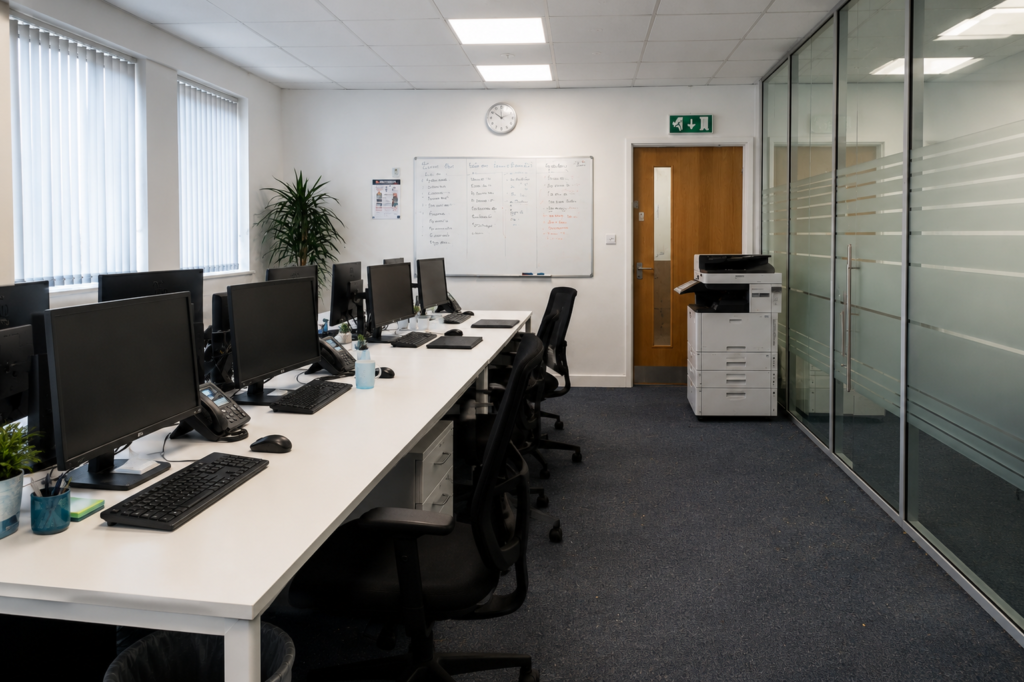
Keeping a workplace hygienic and organised is easier when you know how to clean an office in the right order. A systematic approach helps remove dust, dirt and everyday grime without repeatedly cleaning the same areas.
Whether you are responsible for a small home office, a shared workplace or a larger commercial space, the basic principles are similar: declutter first, work from higher areas downwards, pay attention to frequently touched surfaces, and leave the floor until near the end.
This office cleaning guide takes you through a practical routine you can adapt to the size, layout and daily use of your workplace.
What You Need Before You Start Cleaning an Office
A little preparation can make office cleaning quicker and more organised. Before you begin, remove unnecessary clutter and gather the equipment you are likely to need so you are not constantly stopping to find supplies.
Depending on the office, useful cleaning equipment may include:
- Microfibre cloths
- A vacuum cleaner with suitable attachments
- A mop and bucket or appropriate floor-cleaning system
- Bin liners
- A duster or extendable dusting tool
- Glass cleaner
- Suitable surface cleaner
- Disinfectant where appropriate
- Disposable gloves
- Paper towels or separate cleaning cloths
- A small brush or vacuum attachment for awkward areas
Always use products suitable for the surface being cleaned. Avoid spraying liquids directly onto computers, monitors, keyboards, sockets or other electrical equipment, and check manufacturer care instructions when you are unsure.
How to Clean an Office Step by Step
The best way to clean an office is to follow a logical sequence. Starting with clutter and higher surfaces before progressing to desks, shared areas and floors helps prevent you from undoing work you have already completed.
1. Ventilate the Office Where Appropriate
If the building and weather conditions allow, start by introducing some fresh air. Opening suitable windows for a short period can help freshen a stuffy office while you clean.
Do not leave windows open where doing so could create a security problem, interfere with heating or cooling systems, or allow rain to enter.
2. Remove Clutter and Put Items Back in Place
Cleaning around piles of paperwork, cups, stationery and boxes is inefficient. Clear obvious rubbish and return movable items to their proper places before you start wiping surfaces.
Take particular care with paperwork and personal belongings in shared or commercial offices. Never throw away documents simply because they appear unwanted.
A tidier workspace is also easier to maintain between cleaning sessions. Our guide on keeping an office clean for longer explains how simple everyday habits can reduce the amount of cleaning needed later.
3. Empty the Bins
Collect general waste and recycling according to the workplace’s waste arrangements. Replace liners where necessary and wipe the bin exterior if it is dirty.
If the inside of a bin has leaked or become soiled, clean it using an appropriate product and allow it to dry before fitting a new liner.
Do not compress rubbish bags with your hands because sharp or broken objects may be hidden inside.
4. Dust from High to Low
Dust higher areas before cleaning desks and floors. Depending on the office, this may include accessible shelves, cabinet tops, window ledges, picture frames, partitions and other horizontal surfaces.
Working from top to bottom means any disturbed dust can be collected later rather than falling onto an already-cleaned desk or floor.
Use appropriate equipment for anything above comfortable reach. Avoid balancing on office chairs or desks to reach high areas.
5. Clean Desks and Workstations Carefully
Desks are among the most frequently used areas of an office, but they can also contain paperwork, personal belongings and sensitive equipment.
Move only items that can be safely moved. Wipe the clear areas of the desk with a suitable cleaner, paying attention to commonly touched points such as drawer handles and the edges of the work surface.
Computers and other electronic equipment require more care. Do not soak a cloth or spray cleaning solution directly onto electronics. Follow the manufacturer’s cleaning guidance for monitors, keyboards and specialist equipment.
For a more detailed workstation routine, see how to clean an office desk properly.
6. Clean Frequently Touched Surfaces
Once the main surfaces are clean, pay attention to high-touch areas. These vary between workplaces but commonly include:
- Door handles
- Light switches
- Cupboard and drawer handles
- Shared telephones
- Printer or copier controls
- Meeting-room tables
- Chair arms
- Kitchen appliance handles
- Shared equipment controls
Use a product appropriate for the material and follow its label instructions, including any required contact time if you are using a disinfectant.
Cleaning removes dirt from a surface; disinfecting is a separate process. Where disinfection is needed, the surface should generally be visibly clean first.
7. Clean Meeting and Shared Working Areas
Meeting rooms and communal workspaces can quickly become untidy because several people use them throughout the day.
Remove abandoned cups and rubbish, straighten chairs, wipe tables and clean frequently handled surfaces. Check windowsills, shelving and other areas where dust tends to collect.
Glass tables and internal glass partitions may need a suitable glass cleaner to remove fingerprints and smears.
8. Clean the Office Kitchen or Break Area
Food preparation and break areas deserve separate attention rather than being treated as ordinary desk space.
Clear rubbish and food debris, wash or move used crockery according to workplace arrangements, wipe worktops and clean frequently touched appliance handles and cupboard fronts.
Clean the sink and surrounding area with a suitable product, taking care not to mix incompatible cleaning chemicals.
If the workplace has a larger kitchen or staff food-preparation area, follow the more detailed steps in our step-by-step kitchen cleaning guide.
9. Clean Toilets and Washroom Areas
Use separate cloths and equipment for toilets wherever practical to reduce the risk of transferring contamination to desks, kitchens or other areas.
Clean sinks, taps, dispensers, mirrors and other surfaces before tackling toilets. Pay particular attention to frequently touched areas such as flush controls, door handles and cubicle locks.
Restock soap, toilet paper and other supplies where this forms part of the cleaning routine.
For the full cleaning order and additional guidance, follow our bathroom cleaning method.
10. Vacuum or Sweep the Floors
Leave the floors until most other cleaning has been completed.
Vacuum carpets thoroughly, including accessible edges and beneath movable furniture where practical. In hard-floor areas, remove loose dirt before mopping.
Pay extra attention to entrances, corridors and areas around desks because these often collect more debris.
11. Mop Suitable Hard Floors
Use a floor-cleaning product and method suitable for the flooring material. Too much water can damage some surfaces, including certain wood and laminate floors.
Work towards an exit where possible so you do not need to walk back across a freshly cleaned floor.
Use warning signs where a wet floor could present a slipping risk, particularly in a workplace that remains occupied while cleaning is taking place.
12. Carry Out a Final Check
Before finishing, walk through the office and look at the space as a whole.
Check that bins have been dealt with, chairs are positioned neatly, obvious marks have not been missed and cleaning materials have been removed. Make sure floors are safe before people walk over them and return moved items to their appropriate positions.
Explore KeepShine’s free downloadable cleaning resources for practical tools that can make regular cleaning and organisation easier.
Pro Tip
In shared offices, organise your cleaning around zones rather than individual items. Complete one defined area — such as a workstation section, meeting room or break area — before moving to the next. This makes it easier to see what has already been cleaned, reduces unnecessary movement and helps prevent important high-touch areas from being overlooked.
How Often Should an Office Be Cleaned?
There is no single cleaning frequency that suits every office. A small workplace used by two people will have different requirements from a busy office with dozens of employees, visitors, shared kitchens and washrooms.
The most practical approach is to base frequency on use, footfall and the type of area.
High-touch surfaces, toilets and busy kitchen areas may require attention daily or even more frequently in heavily used workplaces. Bins may also need emptying every working day, particularly where they contain food waste.
Desks and general work surfaces can be cleaned regularly according to how they are used, while lower-contact areas such as cabinet tops, skirting boards and some shelving may need less frequent attention.
Floors also vary. Entrance areas can collect dirt quickly during wet weather, while quieter rooms may stay presentable for longer.
Rather than waiting until the whole office looks dirty, create a routine that separates frequent tasks from weekly, periodic and deeper cleaning. Our practical office cleaning schedule can help you decide which jobs need attention and when.
Regular cleaning should also be supported by occasional more detailed work. Areas behind furniture, difficult corners, neglected storage spaces and other places missed during routine cleaning may need a more thorough approach. When that time comes, use our guide to deep cleaning an office.
Mistakes to Avoid
- Using the same cloth everywhere. Taking one cloth from a toilet or kitchen into desk areas can transfer dirt and contamination. Separate equipment by area and change or clean reusable cloths appropriately.
- Spraying cleaner directly onto electronics. Excess liquid can enter keyboards, monitors and other equipment. Follow the manufacturer’s instructions and, where appropriate, apply a suitable product to the cloth rather than directly onto the device.
- Cleaning the floor too early. Dusting shelves and wiping desks after vacuuming can send debris straight back onto the floor. Work from higher surfaces down and leave floor cleaning until near the end.
- Mixing cleaning products. Combining household or commercial cleaning chemicals can be dangerous. Never mix products unless the manufacturer specifically states that it is safe to do so, and always follow label instructions.
- Ignoring high-touch areas. An office can look tidy while handles, switches and shared equipment remain dirty. Include frequently handled surfaces in the routine rather than focusing only on large, visible areas.
- Trying to clean around excessive clutter. This slows the job and makes it easier to miss dirt. Removing unnecessary items first produces better results. You can find more examples in our guide to common office cleaning mistakes to avoid.
If keeping your workplace consistently clean is becoming difficult to manage, KeepShine can provide professional cleaning help tailored to your office and its needs.
Common Questions About Cleaning an Office
Office layouts and working patterns vary, so here are answers to a few practical questions that often arise when establishing a cleaning routine.
Should you dust or vacuum an office first?
Dust higher surfaces first and vacuum afterwards. Dusting can move particles onto lower surfaces and the floor, so vacuuming too early may mean you have to do it again. A top-to-bottom cleaning order generally makes the process more efficient.
Should office desks be disinfected every day?
Not every surface automatically needs daily disinfection. The appropriate frequency depends on how the desk is used, whether it is shared and the hygiene requirements of the workplace. Regular cleaning is important, while high-touch shared surfaces may warrant more frequent attention. Always use disinfectants according to their labels.
What is the best way to clean an office quickly?
Start by removing clutter and rubbish, then work systematically through defined areas. Dust and wipe higher surfaces before desks and high-touch points, deal with kitchens and washrooms using separate equipment, and finish with the floors. Avoid jumping randomly between tasks, as this usually wastes time.
How can employees help keep an office clean?
Simple habits make a noticeable difference. Employees can clear cups and food after use, dispose of rubbish correctly, keep desks reasonably organised and deal with small spills promptly where safe to do so.
These habits complement regular cleaning rather than replacing it, and our guide to maintaining a cleaner office between cleans covers this in more detail.
How long does it take to clean an office?
It depends on the office size, number of rooms, floor type, washroom and kitchen facilities, level of use and how much cleaning is required. A lightly used small office can naturally take much less time than a busy workplace with numerous desks and communal areas. A deep clean will also take longer than routine maintenance cleaning.
Subscribe to KeepShine for more practical office cleaning advice, step-by-step cleaning guides and useful resources to make everyday cleaning easier.
Final Thoughts: A Consistent Routine Makes Office Cleaning Easier
A properly cleaned office does not depend on rushing through as many tasks as possible. The key is having a sensible order: clear clutter, work from high to low, clean frequently touched surfaces carefully, give kitchens and washrooms appropriate attention, and finish with the floors.
Once that routine becomes established, everyday office cleaning becomes much easier to organise and important areas are less likely to be forgotten.
The exact schedule should reflect how the workplace is actually used. Focus more frequently on busy and high-touch areas, while including periodic deeper cleaning for places that do not require daily attention. That combination helps maintain a cleaner, more organised workplace without doing unnecessary work.