
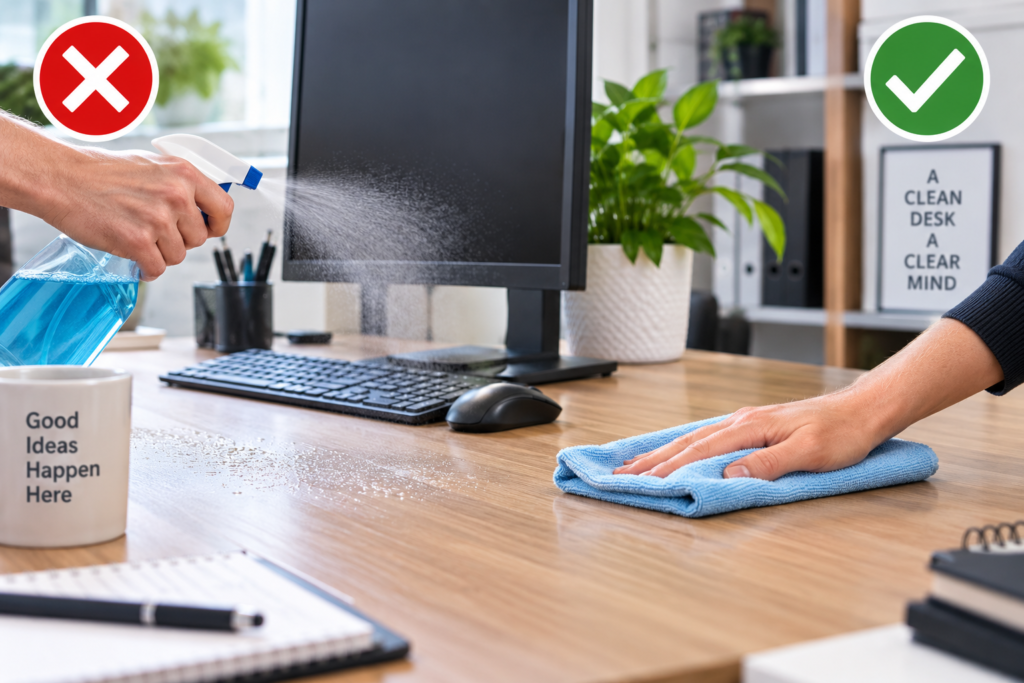
Office desk cleaning mistakes can leave surfaces scratched, stained or damaged, especially when the wrong products or too much moisture are used.
A desk may look straightforward to clean, but it often combines several materials and objects: laminated or wooden surfaces, metal fittings, screens, keyboards, paperwork and electrical equipment. Treating everything in the same way can cause unnecessary damage.
The safest approach is to identify the desk material, remove loose dirt first and use the mildest suitable cleaning method. If you are unsure about a particular finish, check the manufacturer’s care instructions before applying a cleaning product.
If your desk needs a routine clean rather than troubleshooting specific mistakes, our step-by-step office desk cleaning guide explains the complete process.
The Most Common Office Desk Cleaning Mistakes
Many cleaning errors happen because people try to clean quickly. A stronger product, wetter cloth or vigorous scrubbing can seem more effective, but these approaches may create more problems than they solve.
Here are the main mistakes to avoid when you want to clean an office desk without damage.
1. Using a Cleaner Without Checking the Desk Material
Not every desk surface can tolerate the same cleaning products. Solid wood, wood veneer, laminate, glass and painted surfaces can all have different care requirements.
Using a strong multipurpose cleaner simply because it is available can dull a finish, cause discolouration or affect protective coatings.
Before using an unfamiliar product, check whether it is suitable for the particular surface. Follow the manufacturer’s instructions and, where appropriate, test it on a small, inconspicuous area first.
For everyday cleaning, a soft microfibre cloth and a cleaning solution known to be suitable for the surface are usually a more sensible starting point than immediately reaching for something stronger.
2. Spraying Cleaning Product Directly Onto the Desk
Spraying generously across the desk can leave much more liquid on the surface than you actually need.
The excess can run towards joins, edges, cable openings, drawers or electrical equipment. On some desks, repeated exposure to moisture around vulnerable edges may contribute to swelling or deterioration.
Instead, apply a small amount of suitable cleaner to your cloth where the product instructions allow it, then wipe the surface evenly.
This gives you better control over how much moisture reaches the desk.
3. Using Too Much Water
More water does not necessarily mean a cleaner desk.
A soaking-wet cloth can leave moisture sitting on the surface or entering seams and joints. This is particularly important with wood, veneer and some engineered wood products.
Wring your cloth thoroughly so that it is damp rather than dripping. After cleaning, do not leave obvious moisture behind.
If the desk regularly needs more than a light surface clean, our guide to deep cleaning an office desk covers a more thorough approach.
4. Scrubbing Marks With Abrasive Materials
A stubborn mark can tempt you to scrub harder, but abrasive pads, rough sponges and inappropriate scouring products can scratch or dull some desk finishes.
Start gently. Use a suitable cleaner and soft cloth, allow the cleaning method a little time to work where appropriate, and increase your efforts cautiously rather than immediately using an abrasive tool.
For an unfamiliar stain or finish, check the care instructions before attempting stronger treatment.
5. Cleaning Around Everything Instead of Clearing the Des
Wiping around monitors, stationery, paperwork, phones and other objects may make the visible areas look cleaner, but dust and debris remain underneath.
Move removable items somewhere safe before cleaning. This allows you to reach the entire surface and prevents dirt simply being pushed into corners.
It is also a useful opportunity to remove unnecessary papers and objects rather than returning everything automatically.
If clutter and dust build up quickly between cleans, keeping your office desk clean for longer becomes much easier with a few simple daily habits.
6. Treating Electronics Like the Desk Surface
A keyboard, monitor, mouse and other electronic equipment should not automatically be cleaned using the same method as the desk.
Avoid spraying liquid towards electrical equipment. Switch off or disconnect equipment where appropriate before cleaning, and follow the manufacturer’s cleaning guidance.
Keyboards deserve particular attention because dust and debris can collect between the keys. Our guide to cleaning an office keyboard properly explains how to tackle it separately rather than treating it as part of the desktop.
7. Putting Items Back Before the Surface Is Ready
Once you have cleaned the desk, give the surface time to dry before replacing paperwork, electronics and desk accessories.
Putting objects straight onto a damp surface can trap moisture underneath them. Papers can also become damp, while moisture near electronic equipment is best avoided altogether.
Use the opportunity to wipe suitable desk accessories separately before returning them. Otherwise, dusty objects can immediately transfer dirt back onto your freshly cleaned surface.
Browse KeepShine’s free downloadable cleaning resources for practical ways to make regular cleaning and household organisation easier.
Pro Tip
When cleaning a desk with several different materials, work by surface rather than using one product everywhere. Clean the main desktop according to its material, then deal separately with glass, metal fittings and electronics. This takes slightly more thought at the beginning but helps prevent accidental damage caused by assuming every part of the workstation can be cleaned in the same way.
Why Your Desk Material Changes the Way You Should Clean
One of the most important parts of avoiding office desk cleaning errors is recognising that the word “desk” describes many different surfaces.
Wood and Wood Veneer
Wooden surfaces can be particularly sensitive to excess moisture and unsuitable chemicals. Avoid saturating them and do not assume that a product described as suitable for general furniture is automatically right for your particular finish.
Follow the furniture manufacturer’s care guidance where available.
Wood veneer also needs careful treatment. Although it may resemble solid wood, the construction is different, and moisture around damaged edges or joins can be problematic.
Glass Desks and Glass Sections
Glass can show fingerprints, smears and dust very easily. Use a product suitable for the particular glass surface and a clean, non-abrasive cloth.
Avoid using a dirty cloth that already contains grit or debris picked up elsewhere.
Laminate and Engineered Surfaces
Laminate desks are often relatively straightforward to maintain, but that does not make them indestructible.
Pay particular attention to exposed edges, joins and existing chips or damage. Avoid leaving pools of liquid sitting on the surface, and do not use abrasive tools simply because a mark will not disappear immediately.
Painted, Coated or Unfamiliar Finishes
Be cautious when you do not know what coating has been applied.
Rather than experimenting with several strong products, begin with the manufacturer’s recommendations. Testing a suitable product in a hidden area can also help you identify unwanted changes before treating a prominent section.
A desk is only one part of a clean workspace. For a broader routine covering the surrounding environment, see our guide to cleaning an office properly.
Mistakes to Avoid
- Mixing cleaning products. Combining different cleaners can create dangerous reactions, depending on their ingredients. Never mix household or commercial cleaning chemicals unless the manufacturer specifically instructs you to do so.
- Using disinfectant incorrectly. Cleaning and disinfecting are not exactly the same task. If you use a disinfectant, make sure it is appropriate for the surface and follow the product label, including any stated contact time.
- Reusing a very dirty cloth. A cloth containing crumbs, grit and accumulated dirt can simply move contamination around and may potentially mark delicate surfaces. Change or rinse cleaning cloths as necessary.
- Ignoring the underside and edges. Cleaning only the obvious top surface allows dust and grime to build around edges, drawer handles and other frequently touched areas.
- Forgetting your hands and frequently touched objects. A freshly cleaned desk can quickly become dirty again when phones, mugs, stationery and other frequently handled items are returned without attention.
- Waiting until the desk is visibly filthy. Small, regular cleans are generally easier than repeatedly allowing heavy dirt and clutter to accumulate. A sensible office desk cleaning schedule can help you decide what needs attention and when.
If keeping your workplace consistently clean is becoming difficult to manage, KeepShine can provide professional cleaning support to suit your premises.
More Questions About Cleaning an Office Desk Safely
These answers cover a few practical questions that often come up when trying to keep a desk clean without damaging its surfaces or equipment.
How often should an office desk be cleaned?
Frequently touched areas may benefit from regular attention, while more thorough cleaning can be done periodically according to use. A shared desk or heavily used workstation will generally need attention more often than one that is rarely used. Spills and obvious dirt should be dealt with promptly rather than waiting for the next scheduled clean.
Can I use washing-up liquid on an office desk?
That depends on the desk material and its finish. Do not assume that a product is safe simply because it is mild enough for another household task. Check the desk manufacturer’s care recommendations where available, use only a suitable amount, and avoid saturating the surface.
Should I disinfect my desk every day?
Not every desk necessarily needs daily disinfection. The appropriate routine depends on how the workspace is used, whether it is shared and any workplace hygiene requirements. Regular cleaning removes everyday dirt, while disinfectants should be used when appropriate and according to their label instructions rather than automatically applied to every surface.
What should I do if I spill a drink on my desk?
Deal with the spill promptly. Move vulnerable paperwork and electrical equipment away if it is safe to do so, then blot or wipe up the liquid rather than spreading it across a larger area. Pay attention to edges and joins where liquid may collect, and follow the appropriate care guidance for the desk material.
How do I stop dust building up so quickly?
Reducing clutter makes the surface easier to wipe regularly. Avoid allowing unnecessary papers, packaging and unused objects to accumulate, and give frequently used items a consistent place. Regular light cleaning can prevent a small amount of dust from becoming a much larger job.
Does the whole office need cleaning as often as the desk?
Not necessarily. Different parts of a workplace accumulate dirt at different rates. Desks and frequently touched areas may need more frequent attention than some less-used surfaces. A planned routine helps separate daily or frequent tasks from periodic deeper cleaning rather than treating every area identically.
Subscribe to KeepShine for more practical cleaning guides, useful resources and straightforward advice for keeping workspaces cleaner and easier to maintain.
Final Thoughts: Make Safe Desk Cleaning a Simple Habit
Avoiding damage is largely about using the right method rather than cleaning more aggressively. Identify the surface, remove loose dirt first, control the amount of moisture you use and treat electronic equipment separately.
Regular maintenance also makes the job easier. Instead of waiting for dust, clutter and marks to become difficult to manage, build a quick desk clean into your normal routine.
When a more thorough clean is needed, tackle it methodically rather than reaching immediately for stronger chemicals or abrasive tools. With sensible product choices and a little regular attention, you can keep your workspace clean while protecting the desk and the equipment sitting on it.