
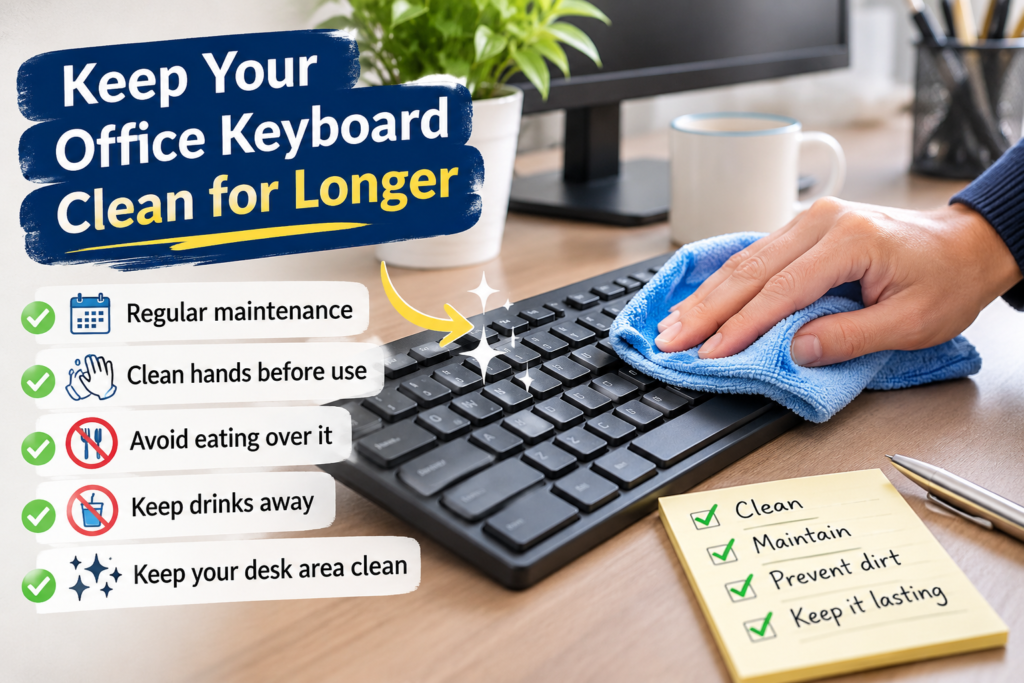
Office keyboards collect dust, crumbs, skin oils and everyday dirt surprisingly quickly. Learning how to keep an office keyboard clean for longer helps maintain a tidier workspace, makes daily typing more pleasant and reduces the need for frequent deep cleaning.
Whether you work from home or share an office with colleagues, a few simple habits can make a noticeable difference. The secret is not just cleaning the keyboard when it looks dirty, but preventing dirt from building up in the first place.
With the right cleaning routine, sensible handling and a little attention to your workspace, you can keep your keyboard looking cleaner for longer without spending too much time maintaining it.
What Makes an Office Keyboard Stay Cleaner for Longer?
The best approach is to combine regular light maintenance with a few preventative habits.
Rather than waiting until dust and dirt become visible, try to:
Remove loose dust and crumbs regularly before they settle between the keys.
Wipe the key surfaces with a clean, slightly damp microfibre cloth when necessary.
Avoid eating directly over your keyboard.
Wash and dry your hands before using shared office equipment.
Keep drinks away from the keyboard to prevent accidental spills.
Clean the surrounding desk area so dust and debris are not transferred back onto the keyboard.
Give your keyboard a more thorough clean periodically.
These small actions help prevent the gradual accumulation of dirt that makes keyboards look worn and neglected.
It is also important to use suitable cleaning materials. Keyboards contain electronic components, so excessive moisture, unsuitable cleaning products and aggressive scrubbing can cause damage. Always follow the manufacturer’s cleaning instructions where available.
7 Practical Ways to Keep Your Office Keyboard Clean
Keeping a keyboard clean does not require complicated equipment or expensive cleaning products. Most of the maintenance can be done using a few everyday cleaning supplies and consistent habits.
1. Remove Dust Before It Builds Up
Dust is one of the main reasons keyboards gradually become dirty. It settles on the keys and collects in the small spaces between them.
If left undisturbed, dust can mix with skin oils and other debris, making it more difficult to remove.
To prevent this:
Use a clean, soft-bristled brush to loosen dust around the keys.
Use a suitable hand-operated air blower to dislodge loose particles where necessary.
Turn an external keyboard upside down carefully and gently shake out loose debris.
Avoid hitting or banging the keyboard against the desk.
For more stubborn dust between the keys, a cleaning method suitable for electronic equipment may help.
A quick dust removal routine once or twice a week can make a difference, particularly in busy offices where several people use the same equipment.
If your keyboard needs more attention, follow our guide to cleaning an office keyboard properlyfor a more detailed cleaning method.
2. Keep Your Hands Clean Before Typing
Your hands come into direct contact with the keyboard throughout the working day.
Natural skin oils, food residue, hand cream and dirt can gradually transfer onto the keys. Over time, this can leave them looking shiny, sticky or discoloured.
A simple preventative habit is to wash your hands before starting work, especially after eating, handling deliveries or completing other activities that leave residue on your fingers.
Make sure your hands are completely dry before using the keyboard.
You should also avoid applying hand cream immediately before typing if it leaves a greasy residue.
These habits are particularly useful in shared offices, where several employees may use the same equipment.
3. Avoid Eating Over Your Keyboard
Eating at your desk is convenient, especially when work is busy. However, food crumbs are among the easiest ways to introduce dirt into a keyboard.
Small particles can fall between the keys, where they are difficult to remove without turning the keyboard over or carrying out a more thorough clean.
Greasy foods can also transfer residue onto the key surfaces.
Where possible:
Eat away from your keyboard.
Move your keyboard aside before having lunch at your desk.
Clear food packaging and crumbs immediately.
Wipe your desk after eating.
Wash your hands before returning to work.
If you regularly eat at your workstation, pay particular attention to the spaces around the keyboard. Crumbs on the desk can easily find their way underneath the keys.
Keeping your desk clean is just as important as maintaining the keyboard itself.
4. Wipe the Keys with a Microfibre Cloth
A microfibre cloth is useful for removing light dust, fingerprints and everyday surface marks.
For routine maintenance, switch off and disconnect the keyboard before cleaning it. If it is wireless, follow the manufacturer’s instructions for switching it off and removing batteries where appropriate.
Lightly dampen a clean microfibre cloth with water, then wring it out thoroughly.
Wipe the tops of the keys gently without allowing moisture to enter the gaps.
For areas that need additional attention, use a cleaning product specifically approved for your keyboard’s materials and follow its instructions.
Avoid spraying cleaning products directly onto the keyboard.
Allow the surface to dry completely before reconnecting and using the equipment.
This simple routine helps prevent fingerprints and greasy marks from becoming more noticeable over time.
5. Keep Drinks Away from the Keyboard
A drink beside your keyboard might seem harmless, but accidental spills can cause serious problems.
Water, tea, coffee and other liquids can enter the spaces between the keys and reach internal electronic components.
Even a small spill can leave sticky residue behind.
To reduce the risk:
Keep drinks on a separate part of the desk.
Use a stable cup or bottle with a secure lid.
Avoid placing drinks directly behind the keyboard.
Move the keyboard away when handling open containers.
Clean the surrounding desk surface after spills.
If liquid is accidentally spilled onto the keyboard, disconnect it or switch it off immediately if safe to do so.
Do not reconnect it simply because the surface appears dry. Follow the manufacturer’s spill guidance and seek professional advice if necessary.
Prevention is considerably easier than dealing with liquid damage.
6. Keep the Surrounding Desk Area Clean
A clean keyboard can quickly become dusty again if the surrounding workspace is neglected.
Dust, paper fibres, food crumbs and other debris accumulate on office desks throughout the day. When you move your keyboard, these particles can transfer onto its underside and key surfaces.
Make desk cleaning part of your regular office maintenance routine.
Pay attention to:
The area underneath and around the keyboard.
The edges of the desk where dust collects.
Mouse mats and other accessories.
The space between the keyboard and computer monitor.
Areas where food or drinks are occasionally placed.
For a more organised workspace, see our guide on cleaning an office desk properly.
You should also remember that computer monitors and other equipment collect dust. Keeping the entire workstation clean helps maintain a more consistent standard of cleanliness.
7. Give Your Keyboard Regular Maintenance
Even when you follow good daily habits, your keyboard will still need occasional attention.
A maintenance routine prevents dirt from accumulating unnoticed and helps you identify problems before they become more difficult to deal with.
For example, you could:
Check the keys for visible dirt at the end of each week.
Remove loose dust regularly.
Wipe frequently touched surfaces when needed.
Inspect the spaces between keys for trapped debris.
Carry out a more thorough clean when the keyboard needs it.
The frequency will depend on how many people use the keyboard, the working environment and how quickly it becomes dirty.
A keyboard used by one person in a clean home office may need less attention than shared equipment in a busy workplace.
Explore KeepShine’s free cleaning resources for practical ways to organise regular cleaning and keep your workspace in better condition.
Pro Tip

A useful professional cleaning habit is to clean from the least dirty areas towards the dirtiest. Start with the surrounding desk, then move to the keyboard’s exterior and key surfaces. This helps avoid transferring loose dust and debris from neglected areas onto surfaces you have already cleaned. Always use separate clean cloths where necessary.
How to Prevent Dust and Dirt from Returning
Cleaning removes existing dirt, but prevention is what makes the difference between a keyboard that stays clean for several days and one that needs attention again almost immediately.
The working environment plays an important role.
Control Dust Around Your Workstation
If your office is frequently dusty, cleaning the keyboard alone will not solve the problem.
Dust can settle on computer equipment, shelves, desks and other nearby surfaces before gradually finding its way back onto the keyboard.
Regularly dust surrounding furniture and equipment using appropriate cleaning materials.
For general workplace maintenance, our guide to cleaning an office properly explains how to approach the wider workspace.
Consider Using a Keyboard Cover
A keyboard cover can help protect against dust, crumbs and other surface debris when the keyboard is not being used.
This can be particularly useful in shared workspaces, reception areas and environments where equipment is not used continuously.
However, choose a cover designed for your particular keyboard.
Check that it does not interfere with key movement, ventilation or normal operation. Some keyboard manufacturers may recommend against certain covers, so check the equipment guidance first.
Remove the cover periodically and clean it according to its care instructions. Otherwise, trapped dirt underneath can defeat its purpose.
Keep Your Computer Equipment Clean
Your keyboard is only one part of the workstation.
Dust can also collect around your mouse, monitor, cables and other equipment.
For example, fingerprints and dust on a computer screen can make an otherwise tidy desk look neglected.
You can follow our guide to cleaning a computer screen properly to maintain the surrounding equipment without damaging its surface.
A consistent approach to workstation cleaning helps prevent dirt from simply moving from one surface to another.
Establish a Cleaning Schedule
One of the easiest ways to maintain a clean keyboard is to avoid relying on memory.
Set aside a few minutes during your regular office cleaning routine to inspect the keyboard and remove visible dirt.
The schedule should reflect how the equipment is used rather than following an unnecessarily strict timetable.
For additional guidance, see how often an office keyboard should be cleaned.
Mistakes to Avoid
– Spraying cleaning products directly onto the keys: Liquid can enter the gaps and reach sensitive electronic components. Apply suitable products to a cloth instead, following the manufacturer’s instructions.
– Using too much water: A soaking-wet cloth can allow moisture to enter the keyboard. Use a thoroughly wrung-out cloth and avoid excessive moisture.
– Using abrasive cleaning materials: Rough sponges, scouring pads and harsh brushes can scratch or damage key surfaces. Choose soft, suitable cleaning materials.
– Forgetting to disconnect the keyboard: Cleaning electronic equipment while it is powered can increase the risk of accidental key presses or electrical problems. Switch off and disconnect it before cleaning.
– Using unsuitable household chemicals: Strong solvents, bleach and other aggressive products may damage plastic, printed characters or protective coatings. Check which products the manufacturer recommends.
– Ignoring dirt between the keys: Wiping only the visible surfaces leaves trapped dust and crumbs behind. Include the spaces around the keys in your maintenance routine.
If keeping your entire workplace clean is becoming difficult to manage, KeepShine can help with professional office cleaning tailored to your workspace.
More Questions About Keeping Office Keyboards Clean
Here are some additional answers to common questions about maintaining a cleaner office keyboard.
How often should I wipe my office keyboard?
There is no single schedule that suits every workplace. A keyboard used by one person may only need occasional surface wiping, while shared equipment may require more frequent attention. Inspect the keys regularly and clean them whenever you notice fingerprints, dust or visible dirt. More detailed cleaning should be carried out as needed.
Can I use disinfectant wipes on my office keyboard?
Some disinfectant wipes are suitable for certain keyboard surfaces, but not all products are compatible with every material. Check the keyboard manufacturer’s cleaning instructions and the disinfectant label before use. Avoid wipes that leave excessive moisture behind, and never allow liquid to enter the spaces between the keys.
Do keyboard covers really help keep keyboards clean?
Yes, a suitable keyboard cover can reduce the amount of dust and debris reaching the keys when the keyboard is not being used. However, it does not eliminate the need for cleaning. The cover itself needs regular maintenance, and you should check that it is compatible with your equipment.
Why does my keyboard become dirty so quickly?
Several factors can contribute, including frequent handling, natural skin oils, food crumbs, dust and the surrounding office environment. Shared keyboards may accumulate dirt faster because multiple people use them throughout the day. Improving hand hygiene, avoiding food near the keyboard and maintaining the surrounding desk can help.
Is compressed air safe for cleaning a keyboard?
Compressed air can help remove loose debris from between keys when used correctly. Follow the manufacturer’s instructions, keep the can upright where directed and use short bursts rather than prolonged spraying. Avoid tilting the can or allowing liquid propellant to escape. A soft brush or hand-operated air blower may be a suitable alternative.
Can I remove the keys to clean underneath them?
This depends on the keyboard design. Some external keyboards have removable keycaps, while others are not designed to be dismantled. Removing keys incorrectly can damage the mechanisms or clips underneath. Check the manufacturer’s instructions before attempting to remove any components.
Subscribe to KeepShine for more practical cleaning advice, including simple ways to maintain office equipment and keep your workspace cleaner.
Final Thoughts: Make Keyboard Maintenance Part of Your Office Routine
Keeping an office keyboard clean for longer is mainly about consistency. You do not need to spend time cleaning it thoroughly every day when a few preventative habits can reduce the amount of dirt that builds up.
Keep food and drinks away from the keys, maintain good hand hygiene, remove loose dust regularly and wipe the surfaces when necessary.
Most importantly, do not overlook the surrounding desk and office environment. A clean workstation makes it easier to maintain individual pieces of equipment.
Start with a simple routine that fits your working day. Small, regular actions will help keep your keyboard in better condition and make maintaining a tidy office much easier.